> ## Documentation Index
> Fetch the complete documentation index at: https://captions.ai/llms.txt
> Use this file to discover all available pages before exploring further.
# Sound Effects
> Generate AI sound effects with ElevenLabs, MMAudio, or Stability AI, or import your own clips to punch up transitions and key moments in your videos.
## Overview
Benefits of adding sound effects to your video:
* **Grabs attention** – Sharp sounds can hook viewers in the first second.
* **Emphasizes actions** – Makes edits, transitions, or gestures feel more impactful.
* **Enhances comedy** – Well-timed effects make jokes land harder and funnier.
* **Builds atmosphere** – Adds texture and depth to otherwise quiet or flat moments.
* **Improves pacing** – Gives rhythm to scenes and helps guide the viewer’s focus.
* **Boosts storytelling** – Reinforces key moments and emotions without needing dialogue.
* **Feels more professional** – Sound design adds polish and production value.
## How It Works
### Generate Sound Effects
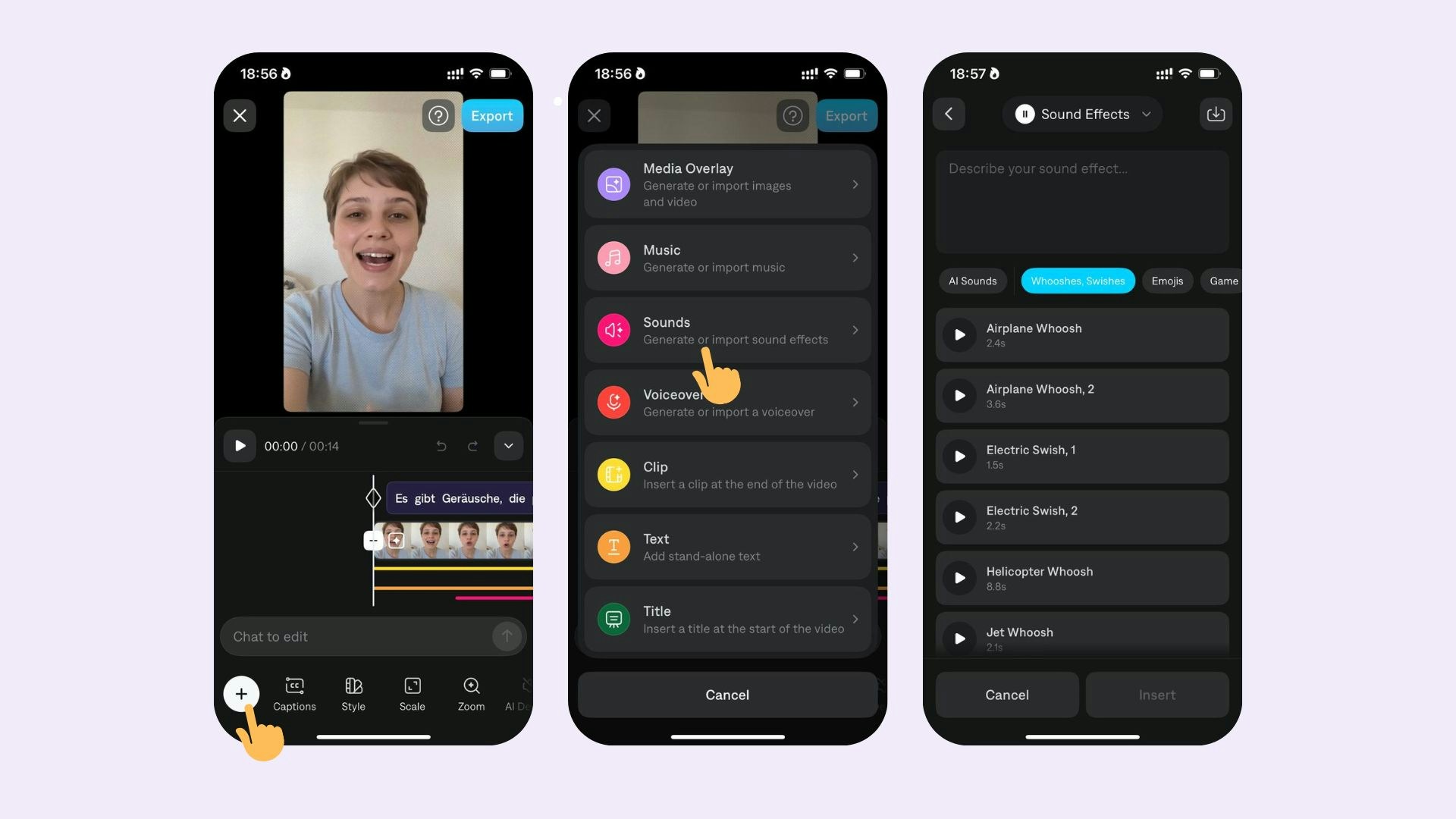 To generate a sound:
1. Select **Sounds**
2. Select **Generate**
3. Enter your prompt (eg., upbeat jazz)
### Import Sound Effects
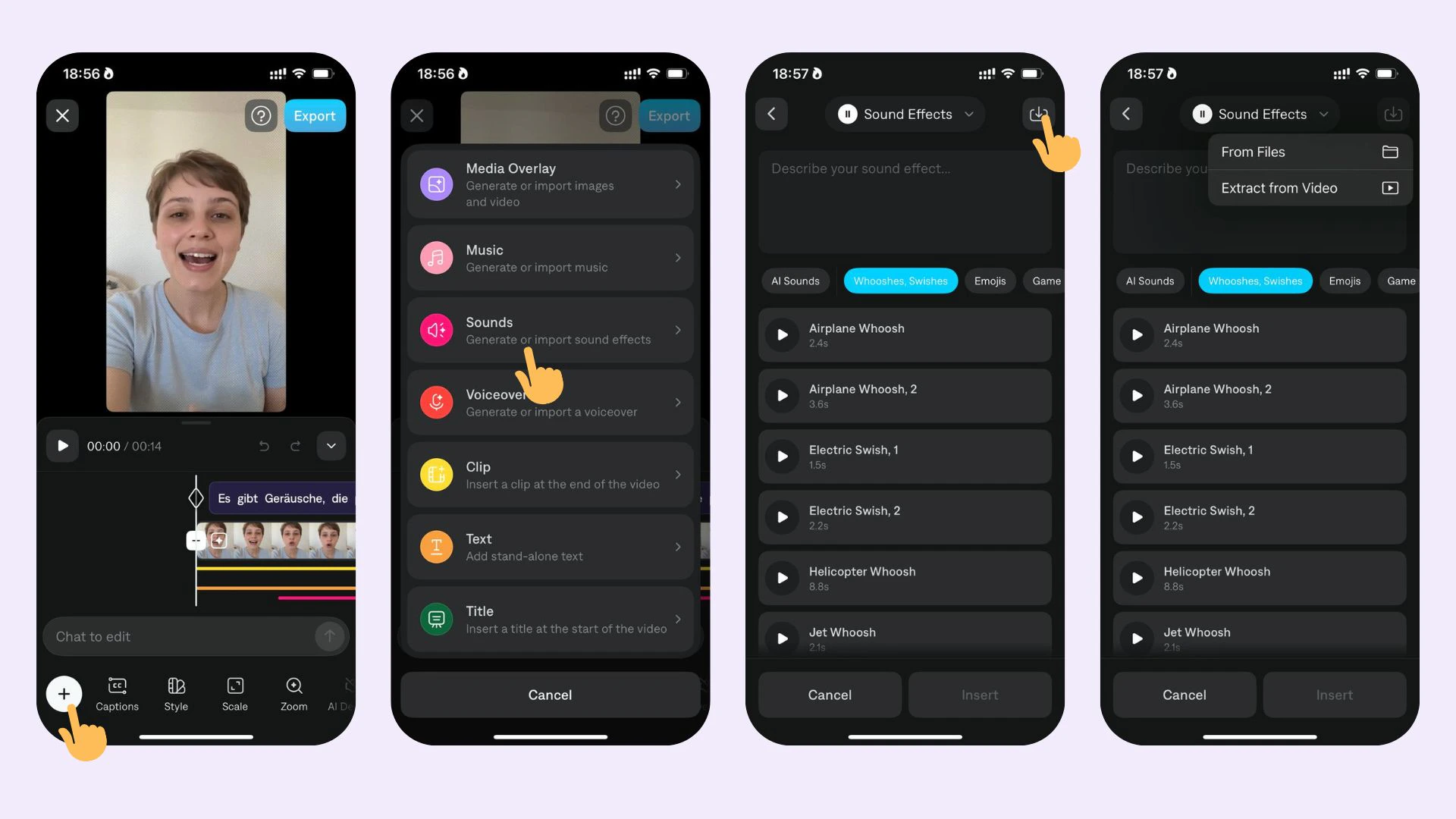
To add sound effects from your device:
1. Tap **Sounds**
2. Tap **Import**
Youc an choose to Import a sound from files or Import a sound from an existing Captions project.
To generate a sound:
1. Select **Sounds**
2. Select **Generate**
3. Enter your prompt (eg., upbeat jazz)
### Import Sound Effects
To add sound effects from your device:
1. Tap **Sounds**
2. Tap **Import**
Youc an choose to Import a sound from files or Import a sound from an existing Captions project.
 ### Edit Sound Effects
To edit sounds, choose from the following options:
* To move the location of a sound, use one finger to drag the sound to a new location
* To adjust the volume of a sound, tap on the sound track
* To delete a sound, tap **Delete**
### Frequently Asked Questions
Some transitions have sounds automatically applied. You can remove them by tapping on **Sounds** on the main navigation.
For generating sound effects, Captions supports 3 integrations with different AI models:
* Sound Effects (ElevenLabs)
* MMAudio (MMAudio)
* Stable Audio Open (Stability AI)
### Edit Sound Effects
To edit sounds, choose from the following options:
* To move the location of a sound, use one finger to drag the sound to a new location
* To adjust the volume of a sound, tap on the sound track
* To delete a sound, tap **Delete**
### Frequently Asked Questions
Some transitions have sounds automatically applied. You can remove them by tapping on **Sounds** on the main navigation.
For generating sound effects, Captions supports 3 integrations with different AI models:
* Sound Effects (ElevenLabs)
* MMAudio (MMAudio)
* Stable Audio Open (Stability AI)