> ## Documentation Index
> Fetch the complete documentation index at: https://captions.ai/llms.txt
> Use this file to discover all available pages before exploring further.
# Aufnahmen neu anordnen
> Aufnahmen in der Zeitleiste Ihres Projekts neu anordnen
**Wer kann diese Funktion nutzen?**
👤 Kunden in allen Plänen: [Free, Pro, Max, Scale](/help/docs/de/subscriptions)
📱 Kunden auf [iOS](/help/docs/de/app/ios)
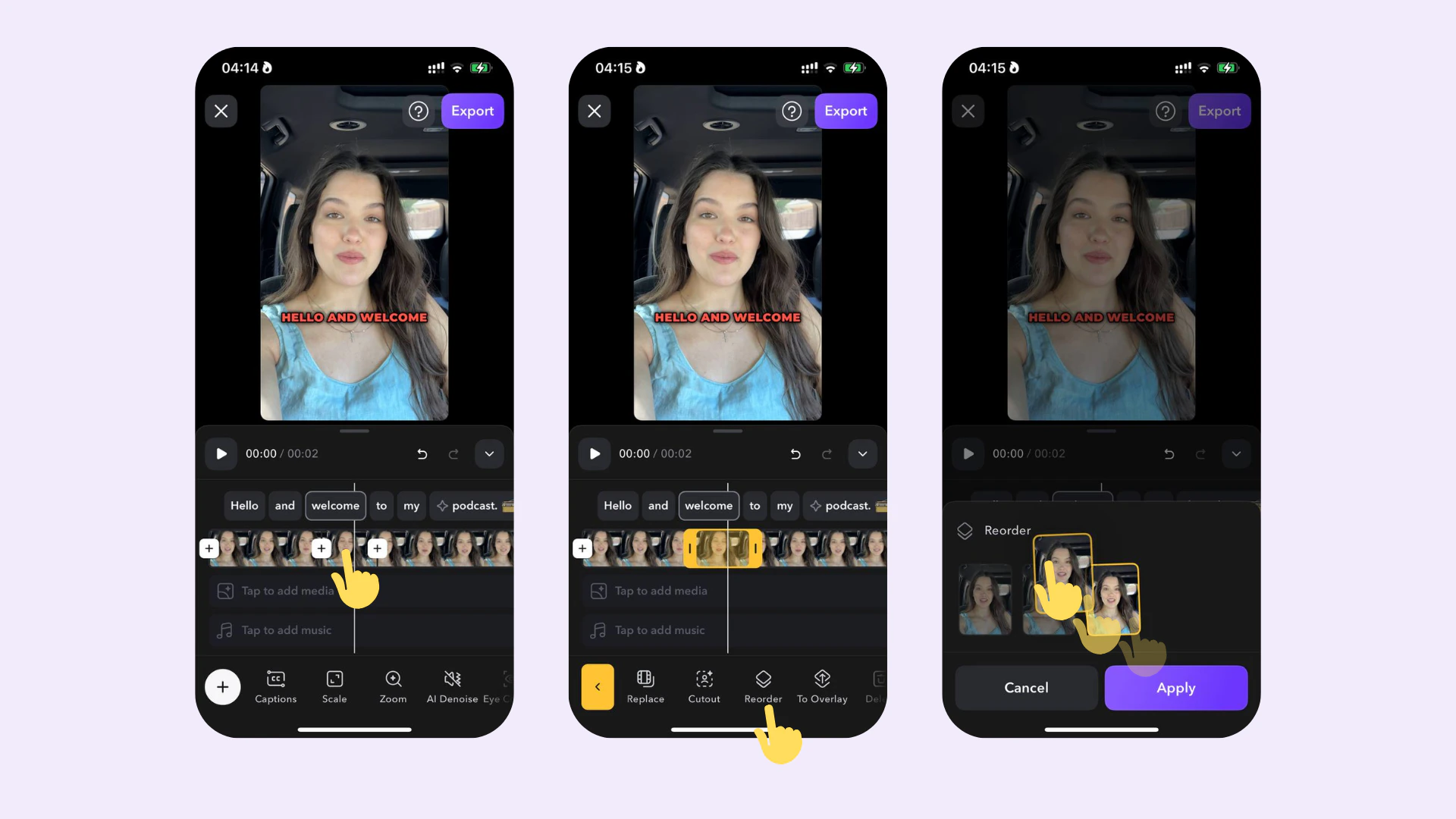 ## So funktioniert es
Zum Anpassen der Reihenfolge einer Aufnahme:
1. Tippen Sie auf die Aufnahme in der Zeitleiste
2. Tippen Sie auf **Neu anordnen**
3. Ordnen Sie die Aufnahme durch Ziehen vorwärts oder rückwärts neu an
## So funktioniert es
Zum Anpassen der Reihenfolge einer Aufnahme:
1. Tippen Sie auf die Aufnahme in der Zeitleiste
2. Tippen Sie auf **Neu anordnen**
3. Ordnen Sie die Aufnahme durch Ziehen vorwärts oder rückwärts neu an