> ## Documentation Index
> Fetch the complete documentation index at: https://captions.ai/llms.txt
> Use this file to discover all available pages before exploring further.
# AI Shorts for Converting Long Videos
> Turn long videos into short clips automatically with AI Shorts. Upload your video or paste a YouTube URL and generate multiple clips for social media.
# Turn Long Videos into Short Clips with AI Shorts
## How it works
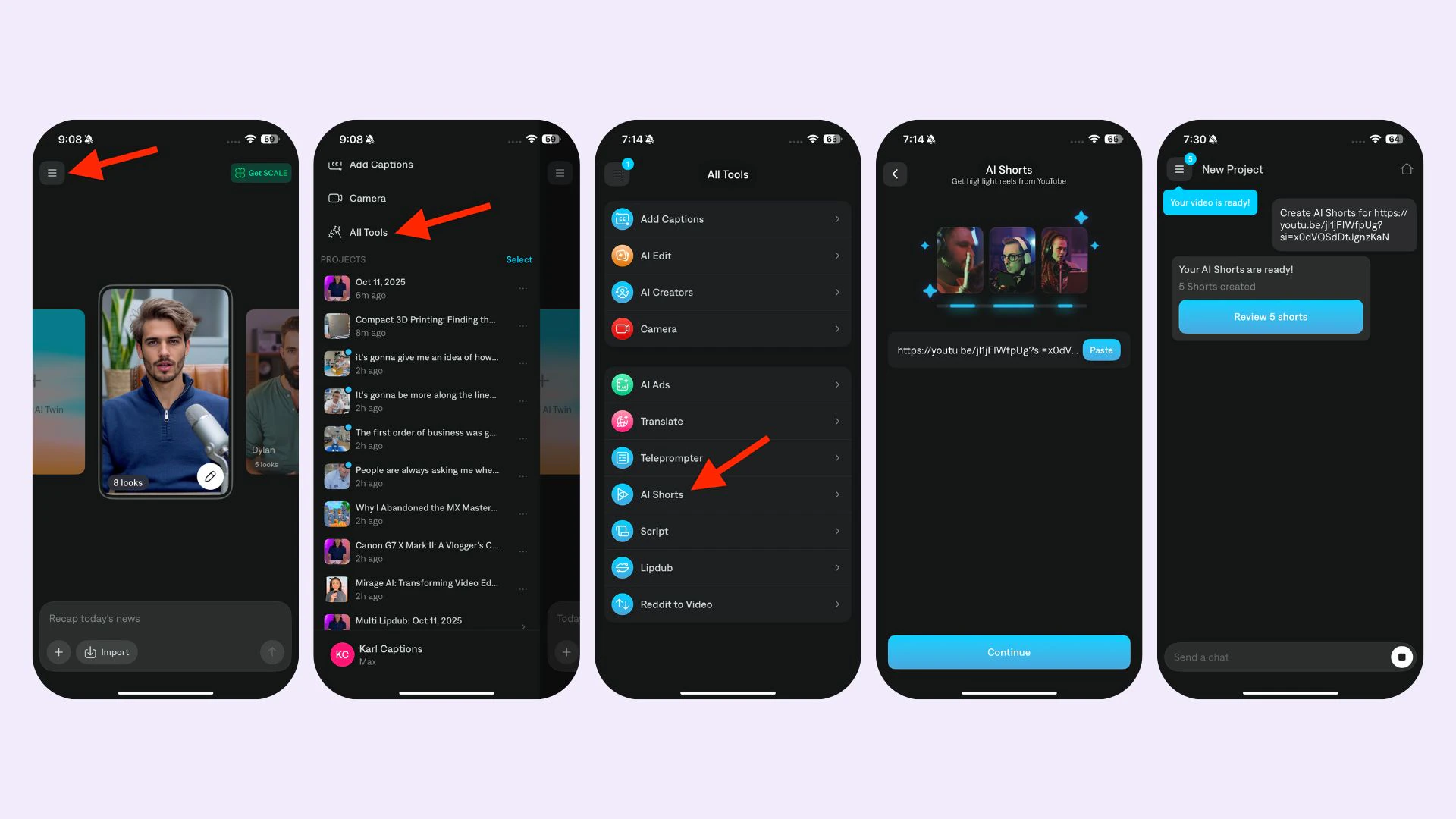 To generate an AI Short:
1. Navigate to AI Shorts
2. Upload your video or paste the YouTube URL
3. Wait for your clips to be generated, which can take up to one hour
4. Review, edit, and [download your clips](/help/docs/settings/export)
## Supported languages
* **On iOS:** Chinese, Dutch, English, French, German, Italian. Japanese, Korean. Portuguese, Spanish, and Swedish
* **On Desktop:** Arabic, Chinese (simplified), Chinese (traditional), Danish, Dutch, English, Filipino (Tagalog), Finnish, French, german, Greek, Hindi, Hinglish, Indonesian, Italian, Japanese, Korean, Malay, Polish, Portuguese, Russian, Spanish, Swedish, Tamil, Turkish, Ukrainian.
## Frequently Asked Questions
[Captions](/help/docs/captions/add-captions) can only be generated in the original language
Original videos must be between 4 minutes and 2 hours long.
YouTube links must be listed as Public or Unlisted (Private videos will not work). Please also ensure that the video does not include "live" in the URL. If it does, simply click the link and then copy the redirected link
To generate an AI Short:
1. Navigate to AI Shorts
2. Upload your video or paste the YouTube URL
3. Wait for your clips to be generated, which can take up to one hour
4. Review, edit, and [download your clips](/help/docs/settings/export)
## Supported languages
* **On iOS:** Chinese, Dutch, English, French, German, Italian. Japanese, Korean. Portuguese, Spanish, and Swedish
* **On Desktop:** Arabic, Chinese (simplified), Chinese (traditional), Danish, Dutch, English, Filipino (Tagalog), Finnish, French, german, Greek, Hindi, Hinglish, Indonesian, Italian, Japanese, Korean, Malay, Polish, Portuguese, Russian, Spanish, Swedish, Tamil, Turkish, Ukrainian.
## Frequently Asked Questions
[Captions](/help/docs/captions/add-captions) can only be generated in the original language
Original videos must be between 4 minutes and 2 hours long.
YouTube links must be listed as Public or Unlisted (Private videos will not work). Please also ensure that the video does not include "live" in the URL. If it does, simply click the link and then copy the redirected link