> ## Documentation Index
> Fetch the complete documentation index at: https://captions.ai/llms.txt
> Use this file to discover all available pages before exploring further.
# Script Generator
> Generate video scripts with AI in Captions. Describe your idea, pick a template, tone, length, and language to draft a ready-to-record script fast.
# Create Video Scripts Automatically with AI
## How It Works
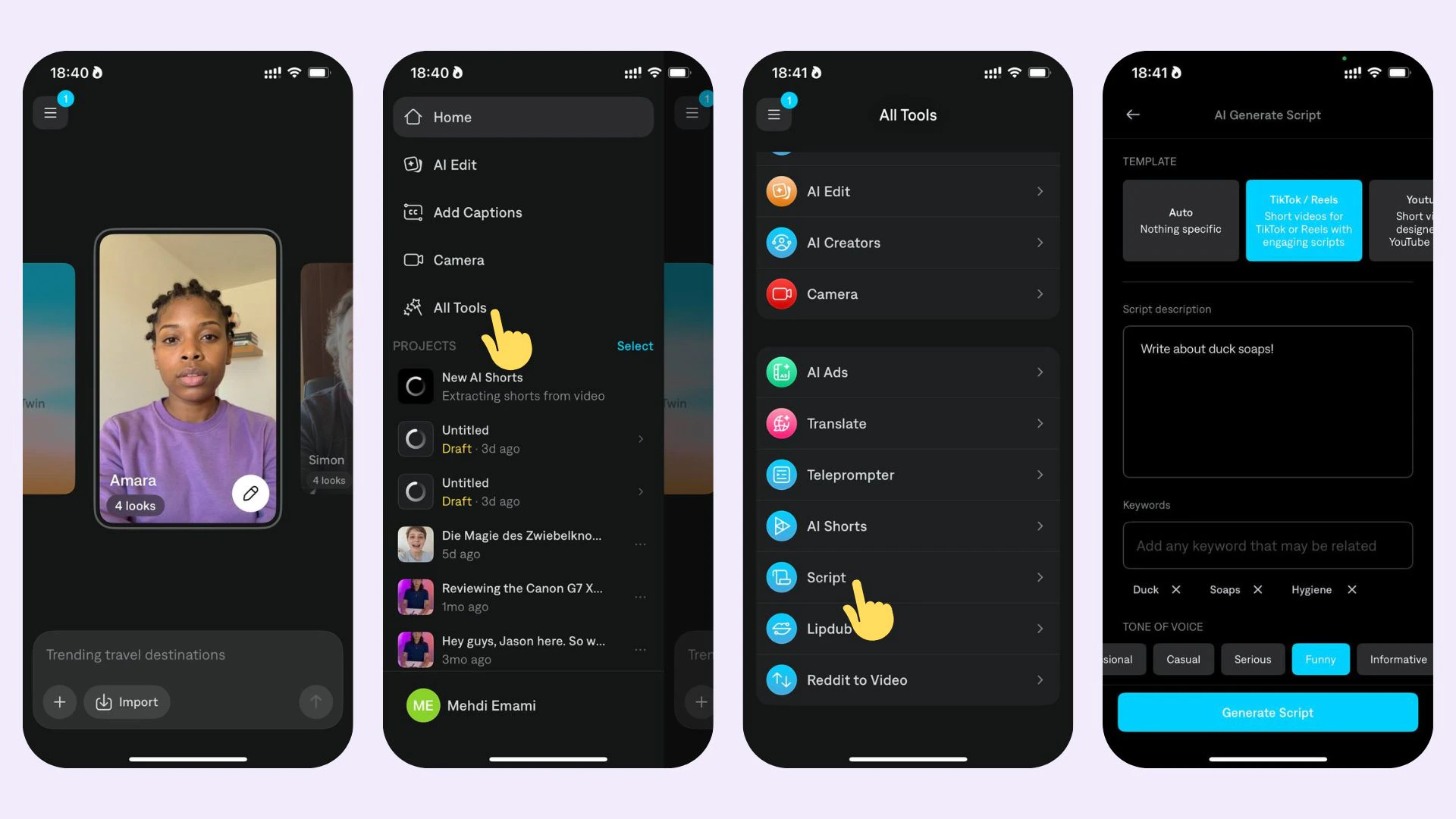 1. Navigate to "Script Generator"
2. Describe in a few sentences what type of script you'd like to create
3. Choose your template, keywords, tone of voice, length, and language
4. Generate your script
## Supported Languages
You can generate scripts in English, Spanish, Portuguese, French, Italian, German, Swedish, Dutch, and Vietnamese.
1. Navigate to "Script Generator"
2. Describe in a few sentences what type of script you'd like to create
3. Choose your template, keywords, tone of voice, length, and language
4. Generate your script
## Supported Languages
You can generate scripts in English, Spanish, Portuguese, French, Italian, German, Swedish, Dutch, and Vietnamese.