> ## Documentation Index
> Fetch the complete documentation index at: https://captions.ai/llms.txt
> Use this file to discover all available pages before exploring further.
# Captions Cloud
# Back Up and Sync Your Video Clips with Captions Cloud
## Overview
Captions Cloud is a cloud-based backup of all clips you've imported or recorded with the [Captions Camera](/help/docs/project/camera). While projects are not backed up or synced across devices, clips can be recovered and reused
## Availability & Pricing
* Captions Cloud is available on iPhone, and coming soon to Android and Web
* Captions Cloud is available with all [subscription plans](/help/docs/subscriptions) (Captions Basic, Max, and Scale)
## How it works
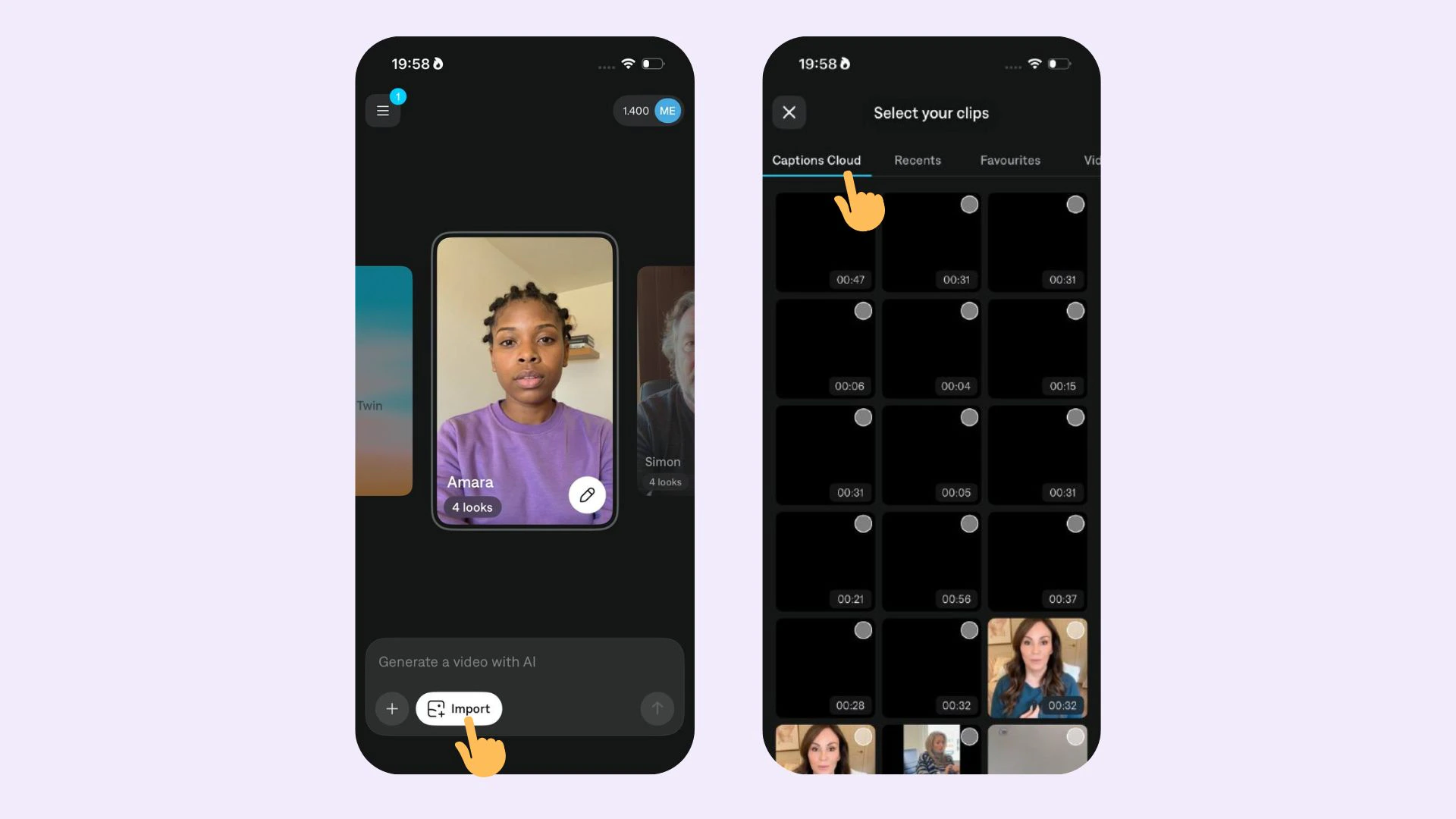 ### Import clips
To recover, reimport, or reuse clips you've previously recorded in app or imported:
1. In Projects, tap on **Create** > **Import**
2. Tap on **Recents**
3. Scroll down and select to **Captions Cloud**
4. Select your clip(s)
### Import clips
To recover, reimport, or reuse clips you've previously recorded in app or imported:
1. In Projects, tap on **Create** > **Import**
2. Tap on **Recents**
3. Scroll down and select to **Captions Cloud**
4. Select your clip(s)