> ## Documentation Index
> Fetch the complete documentation index at: https://captions.ai/llms.txt
> Use this file to discover all available pages before exploring further.
# Shots & Transitions
> View your Captions project by AI-detected shots and add visual transitions between them. Split clips, choose a transition style, and edit or remove it.
# Add Visual Transitions Between Video Shots
## Overview
View your project by shots and easily add transitions between them
## Shots
Using AI, Captions will automatically detect a shot change and add a visual marker. This can be a helpful way to visualize your project and easily add transitions.
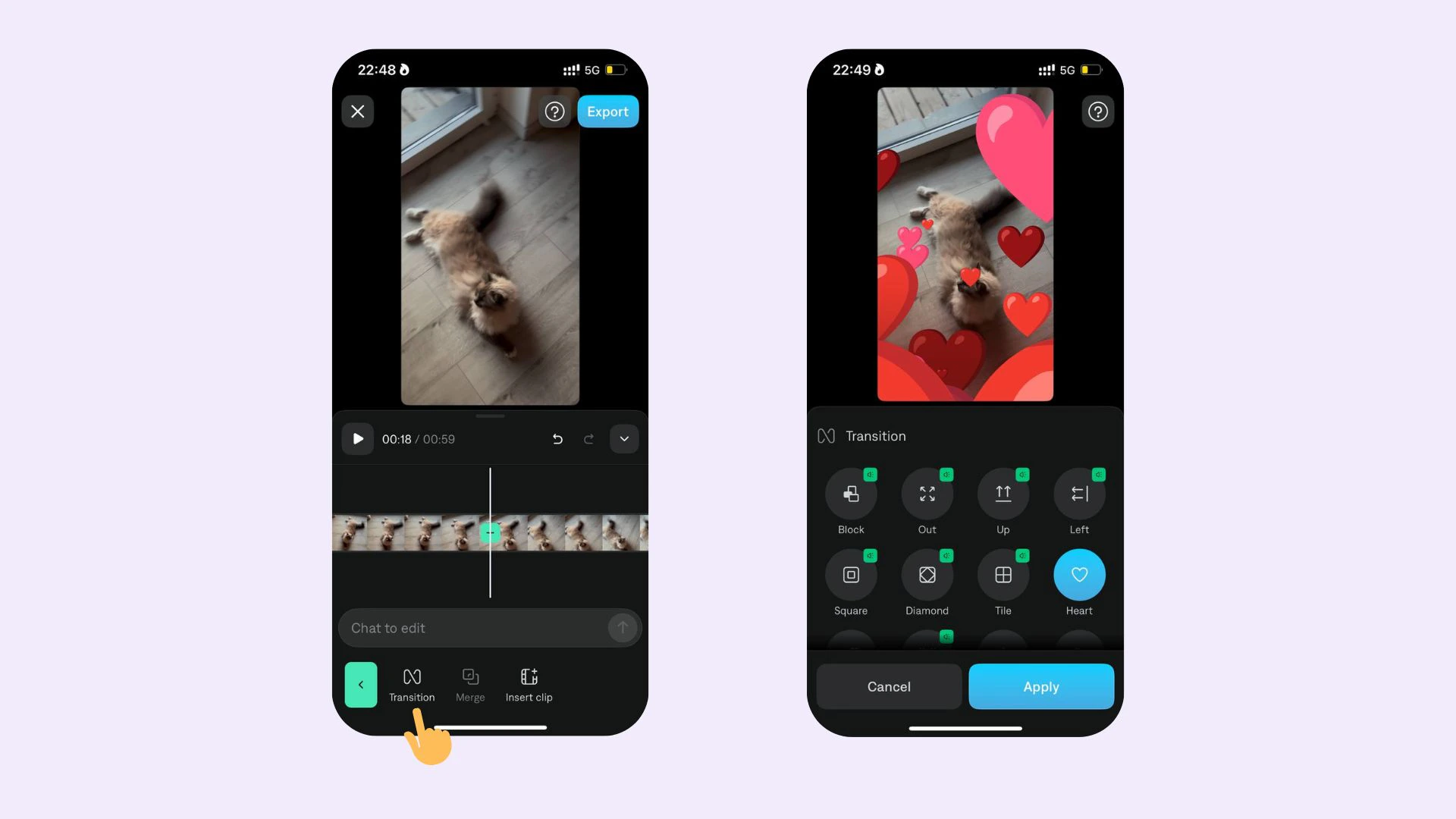 ## Add transition
To add a transition:
1. Scroll on the timeline to the point where you'd like to add a transition
2. Tap **Split**
3. Tap the transition icon
4. Choose your transition
### Edit transition
To edit a transition:
1. Select the transition
2. Change transition style: Tap any of the other options
3. Delete: Tap the selected transition to deselect it
## Add transition
To add a transition:
1. Scroll on the timeline to the point where you'd like to add a transition
2. Tap **Split**
3. Tap the transition icon
4. Choose your transition
### Edit transition
To edit a transition:
1. Select the transition
2. Change transition style: Tap any of the other options
3. Delete: Tap the selected transition to deselect it