

Turn Long Videos into Short Clips with AI Shorts
How it works
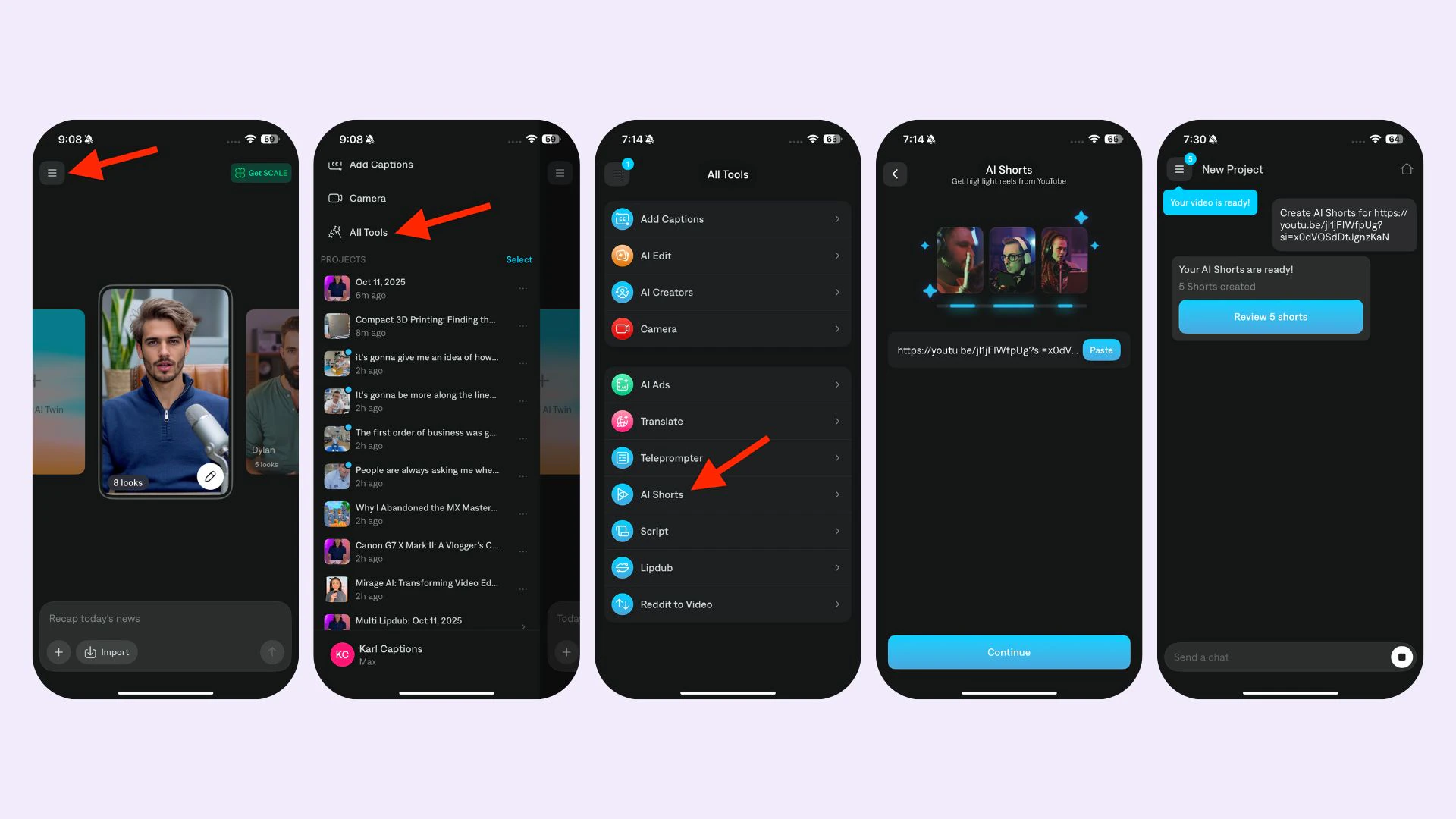
- Navigate to AI Shorts
- Upload your video or paste the YouTube URL
- Wait for your clips to be generated, which can take up to one hour
- Review, edit, and download your clips
Supported languages
- On iOS: Chinese, Dutch, English, French, German, Italian. Japanese, Korean. Portuguese, Spanish, and Swedish
- On Desktop: Arabic, Chinese (simplified), Chinese (traditional), Danish, Dutch, English, Filipino (Tagalog), Finnish, French, german, Greek, Hindi, Hinglish, Indonesian, Italian, Japanese, Korean, Malay, Polish, Portuguese, Russian, Spanish, Swedish, Tamil, Turkish, Ukrainian.
Frequently Asked Questions
Can you translate the video?
Can you translate the video?
Captions can only be generated in the original language
What is the minimum and maximum length of the original video?
What is the minimum and maximum length of the original video?
Original videos must be between 4 minutes and 2 hours long.
What type of YouTube links are supported?
What type of YouTube links are supported?
YouTube links must be listed as Public or Unlisted (Private videos will not work). Please also ensure that the video does not include “live” in the URL. If it does, simply click the link and then copy the redirected link