

How to write a winning AI video prompt
Write a vague AI video prompt, and the output guesses at what you meant. Write a precise one, and the AI executes with the judgment of a director who read your brief twice. This guide covers how prompts work, what to include, and specific examples.
Last updated: May 23, 2026
What is an AI video prompt?
An AI video prompt is a text description you give a video generation model to tell it what to create. Depending on the model, it can range from a single sentence to a structured block of text describing the subject, setting, camera movement, lighting, mood, and style.
Text-to-video AI models (like Captions, Sora, Google Veo, Runway, and Kling) interpret your prompt and generate video footage from it. Think about it this way: the model has no other context. Everything it knows about your intended video comes from what you write.
Image-to-video works slightly differently: You provide a still image as the starting frame, then describe the motion or action you want. The model animates from that reference point, which gives you more control over the visual output.
Just like in more traditional workflows, your inputs can significantly impact output. Think about the typical brief process. If you give your team a strong brief, you’ll be happier with the results. If the original brief is hard to use or too complicated to deliver on, you’ll have a harder time nailing the creative.
The same logic applies to AI video generators. A strong prompt produces a strong output. Here’s how to write one.
What should you include in an AI video prompt?
The best AI video prompts follow a consistent structure. Think of it as six layers, each adding specificity:
- Subject: Who or what is in the video? Be specific about appearance, age, clothing, expression, and any brand elements.
- Example: “A woman in her 30s wearing a white lab coat, looking directly at camera, calm expression”
- Action: What is happening? Describe motion, gesture, and activity.
- Example: “Walking slowly through a modern open-plan office, gesturing toward a whiteboard”
- Setting: Where does the scene take place? Include environment, time of day, and any relevant background detail.
- Example: “A bright, minimal tech startup office, floor-to-ceiling windows, late afternoon”
- Camera: How is the shot framed and does it move? This is where most beginners leave value on the table.
- Example: “Medium shot, slow dolly forward, slight tilt up”
- Lighting and mood: What does the scene feel like?
- Example: “Warm natural light through windows, soft shadows, optimistic and professional mood”
- Style: What’s the visual register?
- Example: “Cinematic, photorealistic, similar to a high-end brand documentary”
Let’s put this together into a single AI video prompt: “A woman in her 30s wearing a white lab coat walks slowly through a bright minimal tech office with floor-to-ceiling windows in late afternoon light. Medium shot, slow dolly forward. Warm natural light, soft shadows. Cinematic, photorealistic, brand documentary style.”
How to write a good AI video prompt
To get the best results, write prompts that are descriptive, clear, and contextualized. Here are the three questions to answer before you write anything.
What’s my goal for this video?
Prompt with your ideal outcome in mind. Decide what your content’s purpose is. Sharing that context with your AI tool helps it adjust messaging to fit your intent. Tell the tool whether you want to sell a product, encourage new subscriptions, or start a conversation with existing followers. If you’re trying to generate something more substantial, provide a full outline to get the results you’re looking for.
You can also reference specific business goals or content metrics to guide the tool further. If you’re making a video to build TikTok engagement, mention that in your prompt.
Who’s the audience?
The best way to create content your viewers will enjoy is through deep audience understanding. As you post more on social media, you’ll start to get a sense of what resonates best for your particular audience. You can also learn more about your audience’s interests and behaviors in the analytics sections of most social media platforms.
Then, include details about your audience in your video prompts. This helps the generator understand who you’re trying to reach, which can impact elements like tone and style.
What format and style do you need?
AI can customize its responses to your ideal format, so tell it specifically what you’re trying to create. Specify the platform you’re posting on and any specific criteria you need the video to include. No matter what you’re creating, including this structure in your prompt will give you the best results.
5 tips for great AI video prompts
1. Be specific
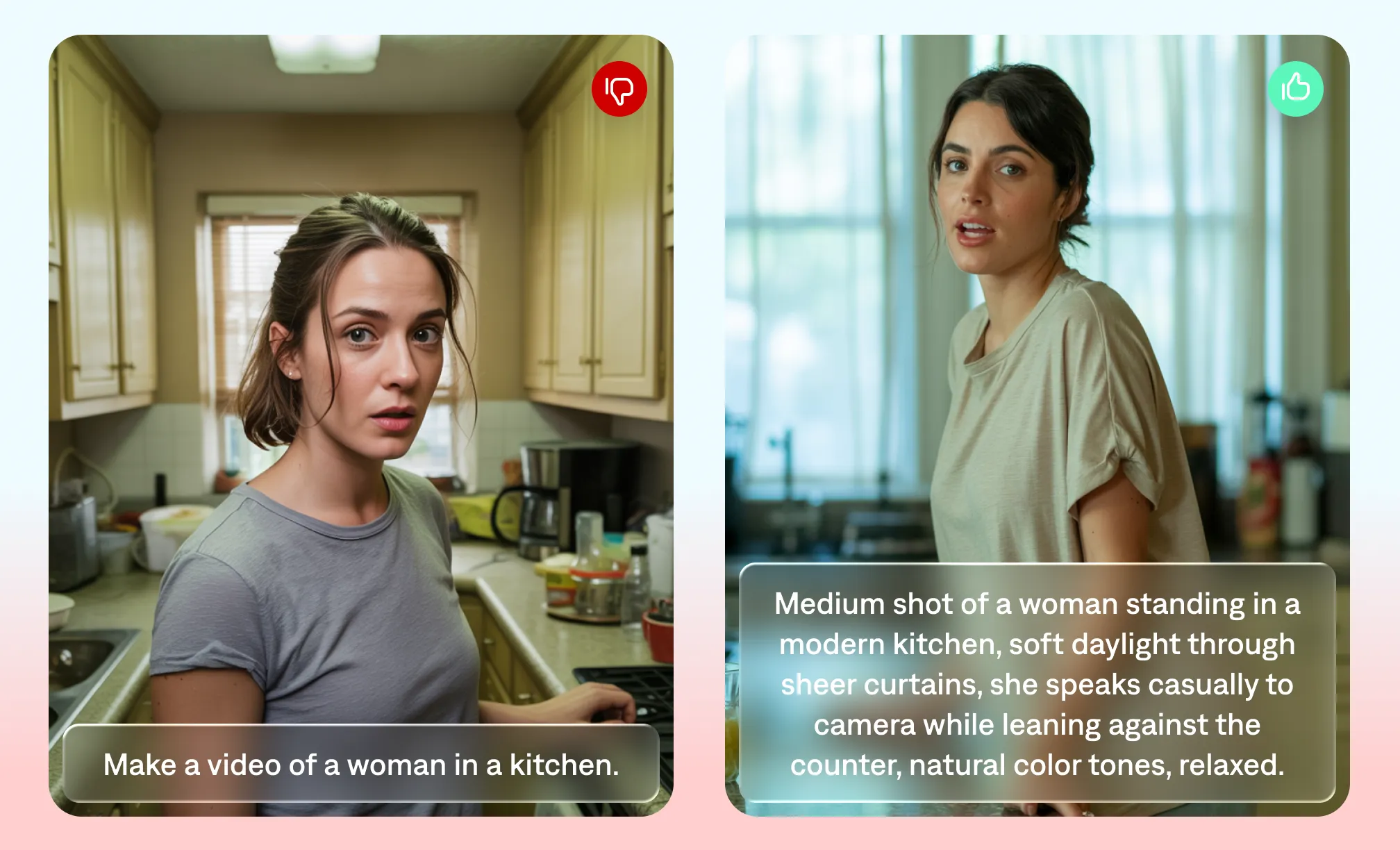
When putting together an AI prompt, be as clear and specific as possible so the AI can understand your needs and generate the response you’re looking for.
Example: “Draft an informational 60-second YouTube Short. The video explains the top five winter hikes in Oregon. Target expert hikers in their 20s who live within a four-hour drive of each hike. Open with a strong hook about why winter hiking in Oregon is underrated. For each hike, include the location, elevation gain and something that makes it unique.”
2. Organize the task into steps
When asking AI tools to complete complex tasks, breaking them down into smaller steps can lead to more accurate results. By focusing on one thing at a time, the AI can deliver more precise responses that don’t overlook part of your message. Plus, if the platform doesn’t give you exactly what you’re looking for, it’s easier to tweak a single step rather than rewrite the entire prompt.
Example: “I need a YouTube video for a 2-minute tutorial that teaches total beginners how to use oil paints. Start with an introduction and include details about the origins of oil paint. Then, describe which art supplies people need to get started. Finally, walk through the steps of sketching and painting a landscape scene of a mountain in the forest.”
3. Share your style
To get AI to generate outputs in your voice, share information about your usual tone or style. This helps the AI produce output that sounds like it really comes from you or your team. Include these details in each prompt so the AI’s outputs have a consistent tone.
Example: “I’m a travel vlogger, and I’ve been to 54 countries. I usually post short-form videos on Instagram Reels and TikTok.”
4. Set the scene
Your AI video generator will provide better results if you share your vision for how the video should look and feel. Include details that help create the world you want: lighting, color, sound, camera movement.
Example: “Use a soft color palette with ambient lighting. Slow tracking shot, moving left to right.”
5. Try different versions
Finding the prompts that give you the best results will take practice. Try writing the same request in different styles to see which response best matches your vision and content style. Once you find the best prompt for your content, turn it into a reusable template.
Example: “Make a TikTok about quick dinner recipes” vs. “Create a two-minute video for a TikTok about five quick dinner recipes: Chickpea curry, Caprese salad, beef stir fry, spaghetti, and one-pan chicken.”
How do camera movements affect AI video prompts?
Camera direction is one of the highest-leverage additions you can make to a prompt. Most beginners skip it entirely and accept whatever framing the model defaults to.
Here are the camera terms that most AI video models understand and respond to consistently:
| Term | What it produces |
|---|---|
| Static shot | Camera doesn’t move; clean, stable frame |
| Dolly in or dolly forward | Camera moves physically toward the subject, which creates intimacy |
| Dolly out | Camera pulls back, good for a reveal or sense of scale |
| Pan left / pan right | Camera rotates horizontally, following action or revealing an environment |
| Tilt up / tilt down | Camera rotates vertically; often used for establishing scale |
| Tracking shot | Camera follows the subject as it moves |
| Orbit / arc shot | Camera circles the subject; good for adding dynamism to product shots |
| Handheld | Slight natural movement, creating immediacy and authenticity (great for UGC style) |
| Drone / aerial | High-angle downward or sweeping view; cinematic, used for establishing shots |
| Zoom in | Optical zoom, creating tension or focus on detail |
In practice: “Close-up shot of a coffee cup on a wooden table, slow dolly out revealing a sunlit café, warm morning light, cinematic” will produce a noticeably more interesting result than “a coffee cup in a café.”
How to describe lighting in an AI video prompt
Lighting determines mood more than almost any other prompt element. A few terms that translate reliably across models:
- Golden hour: Warm, directional, low-angle sun; emotional and cinematic
- Blue hour / dusk: Cool, diffused, slightly moody
- Overcast / soft light: Even, no harsh shadows; clean and modern
- Studio lighting: High-key, controlled; professional and commercial
- Rim lighting / backlit: Dramatic silhouette effect; creates visual contrast
- Natural light, window light: Soft, warm, authentic; works well for UGC and talking-head
- Neon / practical lights: Urban, nighttime, high-contrast; suits lifestyle and fashion content
- Candlelight / firelight: Intimate and warm; lifestyle or narrative
Include lighting as part of the scene description rather than as a separate instruction: “Late afternoon golden hour light streaming through industrial warehouse windows, long warm shadows” is more effective than “use golden hour lighting.”
What is a negative prompt in AI video?
A negative prompt tells the model what to exclude. Not all AI video generators support them, but when available they’re useful for removing common artifacts or unwanted elements. Common negative prompts for video generation:
- “no text overlay, no watermark”
- “no camera shake, no motion blur”
- “no distorted faces, no extra limbs”
- “no low resolution, no pixelation”
- “no quick cuts, no flash editing”
For models that don’t have a dedicated negative prompt field, you can often embed exclusions in the main prompt: “…smooth camera movement, no shake, photorealistic quality, no visible artifacts.”
AI video prompt examples by use case
These are ready-to-use prompts you can adapt for your own content. Each one follows the full anatomy: subject + action + setting + camera + lighting + style.
1. Video ad (product)
“A woman in her late 20s picks up a sleek skincare bottle from a marble bathroom counter, turns it over in her hands, and smiles subtly. Close-up shot, slow dolly in. Soft diffused morning light through frosted glass. Clean, minimal, luxury cosmetics brand aesthetic. Photorealistic.”
2. Tutorial / how-to video
“A pair of hands on a wooden workbench assembling a flat-pack shelf, tools laid out neatly to the side. Overhead shot looking straight down, camera static. Bright, even studio lighting. Clean instructional style, no clutter, high-definition.”
3. Thought leadership / talking head
“A man in his 40s in a smart dark blazer speaking directly to camera in a minimal home office, bookshelves slightly out of focus behind him. Medium shot, static camera. Warm window light from the left, slight lens flare. Cinematic, professional, confident.”
4. Product demo
“A close-up of a smartphone screen showing a clean app interface, a hand scrolling through it with natural, relaxed gestures. Macro lens-style close-up, slow pan following the hand movement. Soft natural light. Photorealistic, sleek tech aesthetic.”
5. UGC-style video
“A young woman in casual clothes sits cross-legged on a couch, looking directly at camera, speaking naturally and gesturing with her hands. Slightly handheld camera movement. Warm practical room lighting, slightly imperfect. Authentic, unpolished, social media native feel.”
6. B-roll / atmosphere
“Aerial drone shot slowly descending toward a busy outdoor farmers market on a sunny morning, stalls full of colorful produce, people browsing. Slow, smooth descent. Bright natural light, warm tones. Cinematic, documentary feel.”
7. Real estate / property tours
“A bright modern living room with floor-to-ceiling windows and minimal Scandinavian furniture. Camera starts in the doorway and slowly tracks forward into the room. Late afternoon golden light. Clean, architectural, aspirational.”
8. Social media hook / TikTok
“Extreme close-up of a hand dropping a single ice cube into a glass of amber liquid, slow motion. Static macro shot. Backlit, dark background, dramatic single light source. Cinematic, high contrast, satisfying.”
9. Educational / how-to
“Animated graphic of a human heart beating, showing blood flow through the chambers, labelled arteries and veins. Camera slowly zooms in on the left ventricle. Clean white background, bright medical illustration style. 3D render, textbook-quality clarity.”
10. Event / launch teaser
“A packed conference auditorium from a wide high-angle shot, crowd murmuring, a single spotlight hitting an empty stage. Slow zoom toward the stage. Dramatic, cinematic, anticipatory. Dark with high-contrast stage lighting.”
Model-specific prompting tips
Different AI video models have different strengths and prompt preferences. Here’s what to know about the most widely used ones.
How do you prompt Captions for the best results?
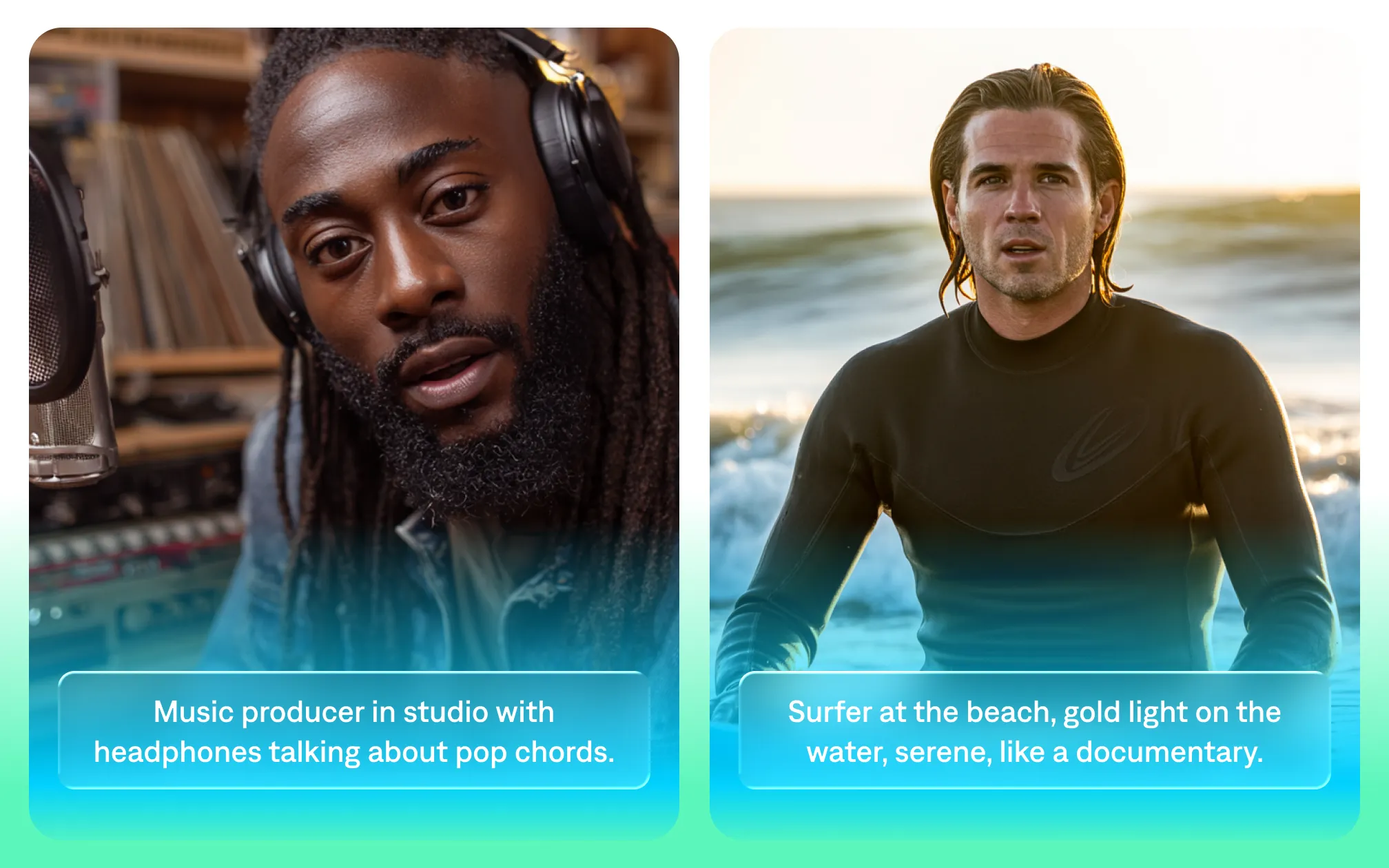
Captions uses advanced AI technology that turns your prompts into high-quality videos. To get the best results, we recommend including cues for details like lighting, background and camera style. This helps Captions understand the vibe you’re going for so it produces better output.
How do you prompt Sora for the best results?
Sora (OpenAI) responds well to highly descriptive, cinematic language. It handles complex scene descriptions and is particularly strong at photorealistic footage and dynamic camera movements. Include specific shot types and lens descriptions.
Sora tends to handle longer prompts well, so more detail generally improves output quality.
How do you prompt Google Veo for the best results?
Veo supports JSON-style structured prompting, which lets you separate out elements like camera angle, motion, lighting, and style into discrete fields. This structured approach produces more predictable outputs than freeform text. If the platform gives you a structured input format, use it (it’s more reliable than trying to cram everything into a single sentence).
How do you prompt Runway for the best results?
Runway Gen (current versions) works well with concise, visual descriptions. It’s particularly strong for stylized and motion-graphic content. For Runway, clarity over length: a precise 30-word prompt often outperforms a vague 100-word one. It also supports image-to-video, where you provide a reference frame and describe the motion you want added.
Turn prompts into videos with Captions
With Captions, prompts get you from zero to video, fast. You can use prompts to generate new videos on your phone or computer; just type what you want to make, and Captions builds it. Then use the chat-based editor to describe any changes you want to see in plain language, and Captions will edit your video accordingly.
All you need to start is a video idea. Captions guides you through the rest, including generating a script for you if you need one.

Try Captions now
Frequently asked questions
What is the difference between a text-to-video and image-to-video prompt?
Text-to-video generates footage entirely from a written description, so the model creates everything from scratch based on your words. Image-to-video starts from a still image you provide and generates motion from that starting frame.
Image-to-video gives you more control over the initial visual composition; text-to-video gives you more flexibility to create scenes without existing assets.
Can you use JSON for AI video prompting?
Some models do support JSON-style structured prompts, like Google Veo. Instead of writing a single paragraph, you organize your prompt into labeled fields: subject, action, camera, lighting, style, duration. This format is most useful for large teams producing significant numbers of clips at a time. It’s less important for solo creators or smaller teams who make content in smaller batches.
What are common AI video prompt mistakes?
You need to be descriptive so the video generator understands what scenes to create.
The most frequent prompt mistakes include:
- Being too vague about the subject (“a person” instead of “a woman in her 30s with short dark hair in a blue blazer”)
- Not specifying camera movement (defaulting to whatever the model chooses)
- Ignoring lighting (which controls mood more than almost anything else)
- Writing a prompt for the idea rather than the visual.